

What the retirement timeline means for the Threat Analysis and Emergency Response Guide widgets your responders use during an incident
Esri is retiring ArcGIS Web AppBuilder. For most agencies, that is a technical footnote. If your responders run hazmat response, threat analysis, or emergency management workflows through Web AppBuilder widgets, it is an operational deadline, and it is closer than the retirement date suggests.
The dates that matter
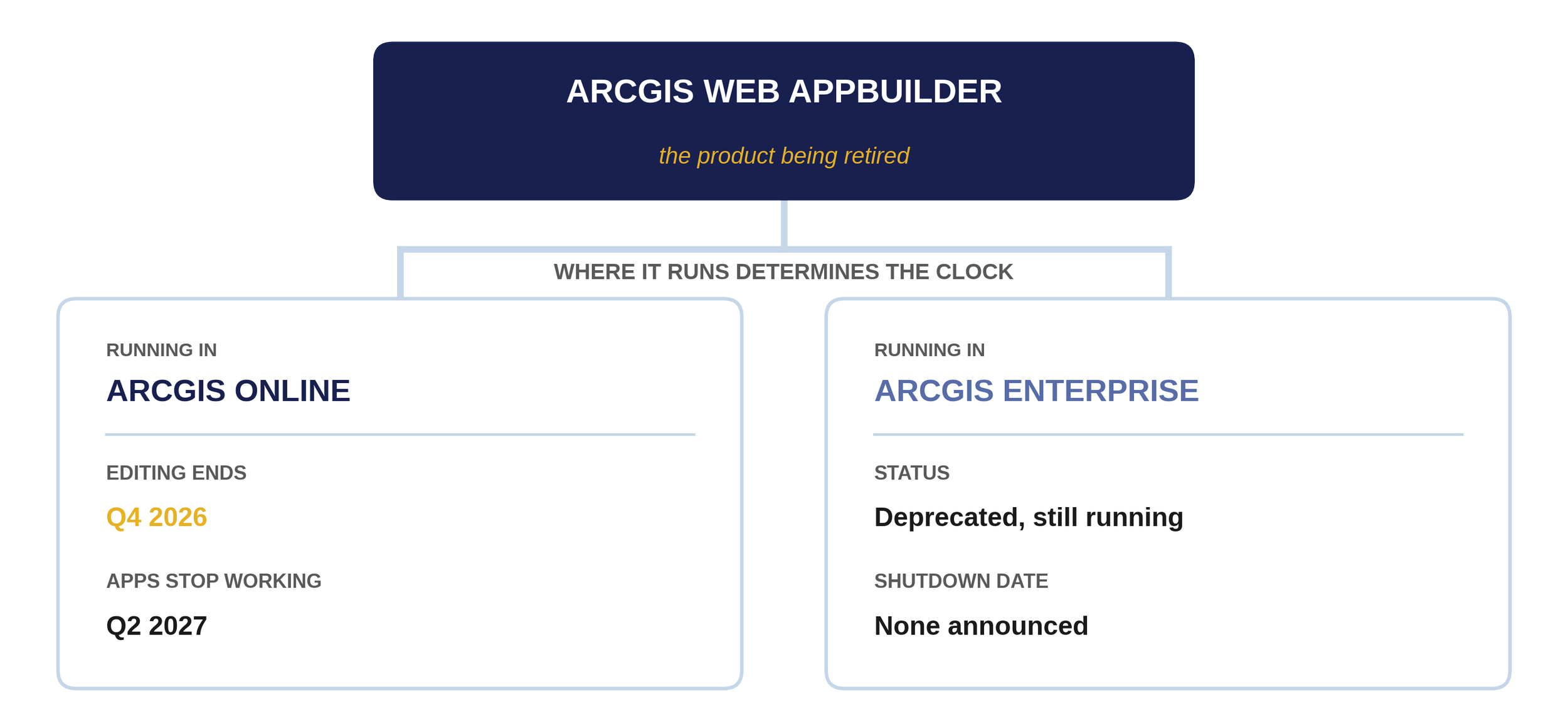
Web AppBuilder retirement in ArcGIS Online is phased, and one phase matters more than the others. New apps have been impossible since Q1 2026. In Q4 2026, editing ends and existing apps freeze in whatever state they are in. In Q2 2027, they stop functioning entirely.
First, check which product you actually run
The countdown above applies only to Web AppBuilder running in ArcGIS Online. The same product running in ArcGIS Enterprise is on a different clock: deprecated since March 2023, included for the last time in Enterprise 11.5, and with no announced shutdown date. Enterprise apps behind your own firewall are not on the 2027 countdown; they are accumulating risk on a deprecated platform with a retired JavaScript API underneath. Online apps are on the clock now. Many agencies run both, which means checking app by app.
What this means for the widgets responders use
The Threat Analysis and Emergency Response Guide widgets are why this retirement is an operational issue rather than an IT ticket. These tools work. Your responders know where to find them, and your procedures name them. The problem is not that they are broken. The platform under them is going away, and widgets do not migrate automatically.
Esri's recommended path is ArcGIS Experience Builder, where it is completing planned parity features. But a migrated capability is not a migrated workflow. The buttons move, the configuration model changes, and the muscle memory your responders built does not transfer with the data.
Four questions to answer before you migrate anything
This is not about buying new software. It is about keeping the capabilities your team depends on working. Four questions frame the work.
How do these tools integrate into incident command procedures? If the EOP or a checklist names the current tool, migration includes a documentation change, not just an app change.
What training does the team actually need? Not platform training in general. Training on the specific workflows responders run, in the order they run them.
How do we maintain continuity during transition? Both the frozen app and its replacement will exist for a while. Someone decides which is authoritative, and everyone knows.
What does success look like on day one? Define it before the cutover: a responder completes the same task in the same or less time without asking for help. Test exactly that.
What to do this quarter
Agencies that start now get to plan the migration. Agencies that wait will do it during an activation. Three things are worth doing before the freeze, no matter what you decide afterward.
Inventory. List every Web AppBuilder app you run, note whether each lives in Online or Enterprise, and flag the ones named in a procedure, plan, or training curriculum.
Freeze-proof. For Online apps, make any known updates before Q4 2026 while editing is still possible. If you have been meaning to fix something, fix it now.
Decide the destination. For each operational app, pick the migration target and the person who owns getting it there. A frozen app with no owner in October is an emergency in June.
Key questions
When does ArcGIS Web AppBuilder retire?
Web AppBuilder in ArcGIS Online retires in the second quarter of 2027, but the phases matter more than the end date. New apps have been impossible since Q1 2026, and editing existing apps ends in Q4 2026. Web AppBuilder in ArcGIS Enterprise is deprecated, with no announced shutdown date.
Will my existing Web AppBuilder apps stop working?
Apps built in ArcGIS Online will stop functioning at retirement in Q2 2027. Before that, they freeze: after the Q4 2026 release, you can view them but no longer update them. Apps in ArcGIS Enterprise continue to run on deprecated technology with no announced end date.
What replaces the Web AppBuilder widgets my agency uses?
Esri's recommended migration path is ArcGIS Experience Builder, and Esri has said it is completing parity features to match Web AppBuilder workflows. The capability moves. The configuration and the muscle memory have to be rebuilt. Each operational widget needs its workflow rebuilt, tested, and trained on the new platform.
What should emergency management agencies do first?
Inventory every Web AppBuilder app, identify which ones appear in procedures and training, and confirm whether each runs in ArcGIS Online or ArcGIS Enterprise, because the timelines differ. Then make any pending updates to Online apps before editing ends in Q4 2026.
Sources
Esri, ArcGIS Web AppBuilder roadmap for retirement, with the phase schedule for ArcGIS Online.
Esri, Web AppBuilder in ArcGIS Online retirement extended, announcing the extension from Q1 2026 to Q2 2027 and the Q4 2026 editing freeze.
Esri, ArcGIS Web AppBuilder product life cycle, covering the Enterprise deprecation status.
Talk it through
If your team depends on these tools and you are not sure where your apps stand, shoot me an email.
I’d be happy to walk through future-proofing your mission-critical tools with you and your team before it’s too late.
About the author
Jamie Jacobs is the Director of Technical Services at Bent Ear Solutions, where she leads the technical practice supporting emergency management, public safety, and critical infrastructure agencies using Esri ArcGIS and Microsoft 365. She previously served as a first responder, Special Operations Paramedic, and a Senior Geospatial Strategy Consultant for Esri.
About Bent Ear Solutions
Bent Ear Solutions, LLC (BES) is a Service-Disabled Veteran-Owned Small Business that helps state, local, tribal, and federal agencies optimize, configure, and integrate the solutions they already have, turning existing GIS, software solutions, sensing, imagery, data, and communications investments into a single system of situational awareness, communication, and incident coordination. Before you buy another software solution, unlock the power and capabilities of what you already own. Learn more at bentearsolutions.com.